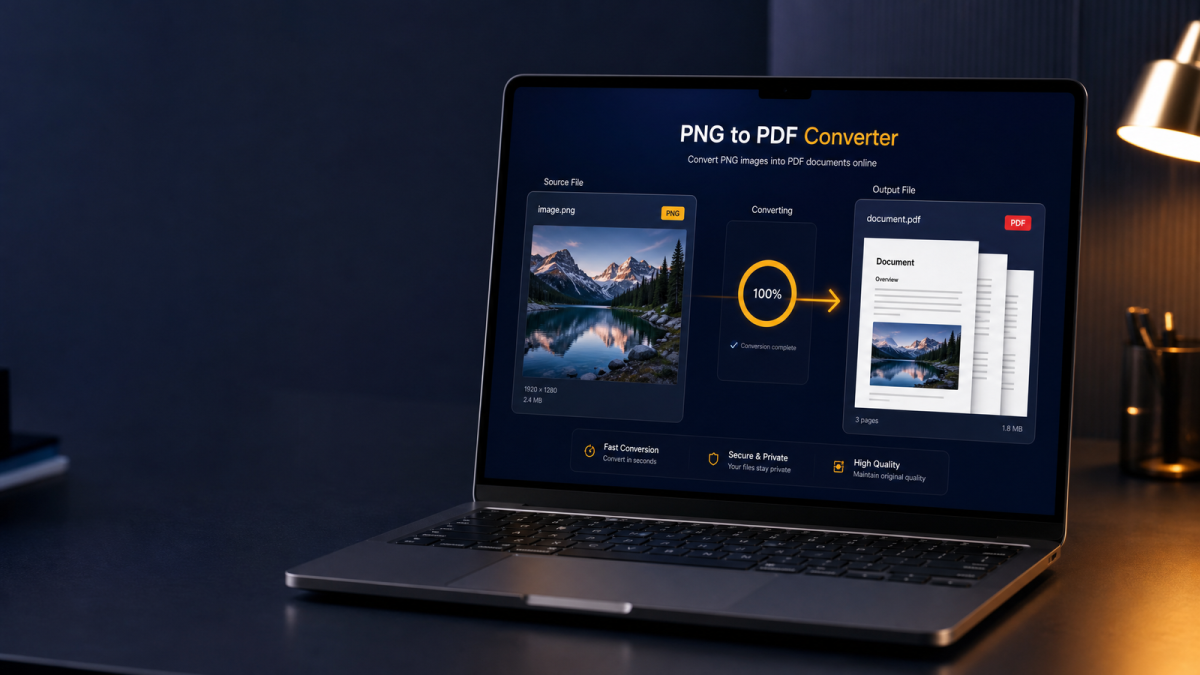
Learning how to convert PNG to PDF online is essential whenever you need screenshots, UI mockups, logos, or lossless graphics in a shareable document. Designers export transparent assets as PNG; support teams capture error dialogs; students photograph worksheets as high-detail images. A reliable PNG to PDF converter turns those files into a clean PDF in seconds — without desktop installs or uploading private screens to a random server.
This guide covers what PNG to PDF conversion is, why people do it, how to convert one or many PNG images to PDF, how to keep quality high, and how the workflow works on Windows, Mac, iPhone, and Android. You will also find comparisons, troubleshooting tips, FAQs, and links to related FlashFile tools such as JPG to PDF, PNG to JPG, Merge PDF, and Compress PDF. For a wider format overview, read the Ultimate Guide to PDF Conversion in 2026. Prefer photos over graphics? See How to Convert JPG to PDF: The Complete Guide.
What Is PNG to PDF Conversion?
PNG to PDF conversion places one or more Portable Network Graphics images inside a PDF file. Each PNG typically becomes a full page (or is fitted to a page size you choose). Recipients open a standard document instead of juggling loose image files.
PNG is a lossless raster format widely used for screenshots, diagrams, icons, and text-heavy images. Wrapping PNG data in PDF does not change the fact that you started with pixel-perfect graphics — a well-built converter preserves resolution so edges stay sharp and UI text stays readable when zoomed.
Why Convert PNG to PDF?
People convert PNG images to PDF for clear, practical reasons:
- Professional packaging: A PDF feels like a finished deliverable, not a folder of raw screenshots.
- Multi-page stories: Step-by-step UI captures or scanned pages become one ordered file.
- Portal requirements: Schools, banks, and HR systems often accept PDF only.
- Print consistency: Page size and margins behave more predictably than printing loose PNGs.
- Archiving graphics: Logos, wireframes, and annotated screenshots stay readable years later in a universal format.
How to Convert PNG to PDF Online (6 Steps)
The fastest path for most people is a free PNG to PDF online tool that runs in the browser. With FlashFile, processing is client-side: your files never leave the device.
- Open the PNG to PDF tool (or browse the full tools directory).
- Drag and drop one or more PNG files, or click to browse your device.
- Confirm the file list and order. Reorder if your converter supports sorting.
- Choose options if available (page size, orientation, fit mode, or quality).
- Click convert and wait a few seconds while the browser builds the PDF.
- Download the finished PDF and open it to verify pages and clarity before you send it.
That is all you need to convert PNG to PDF without installing desktop software — whether you have a single logo export or a multi-page screenshot walkthrough.
How to Convert Multiple PNG Images into One PDF
To convert multiple PNG to PDF as one document, select every image in a single session. Each PNG becomes a page. Name files in order (for example step-01.png, step-02.png) or rearrange them in the tool UI so the sequence matches your tutorial or scan stack. The same multi-page workflow applies when you convert multiple images into one PDF from JPG photos.
If you already created several single-page PDFs, use Merge PDF to combine them. To break a large multi-image PDF apart later, use Split PDF.
PNG vs JPG: Which Is Better for PDF?
Both formats convert cleanly to PDF, but they shine in different cases:
- Choose PNG for screenshots, diagrams, text, sharp edges, and images that need transparency.
- Choose JPG for photographs and camera scans where smaller file size matters more than perfect lossless detail.
FlashFile supports both workflows: PNG to PDF and JPG to PDF. If you must shrink a PNG before packaging, PNG to JPG can help — knowing you trade lossless quality for size.
Does Converting PNG to PDF Reduce Image Quality?
Conversion itself does not have to reduce quality. Quality loss happens when a tool:
- Downscales the image to a small page size at low DPI
- Re-encodes through a lossy intermediate (for example forced JPEG inside the PDF)
- Applies heavy PDF compression after embedding
A careful PNG to PDF converter preserves resolution so UI text and thin lines stay crisp when you zoom.
How to Convert PNG to PDF Without Losing Quality
- Start from the original export — not a second screenshot of an already compressed preview.
- Avoid “email size” or “maximum compression” presets unless you truly need a tiny file.
- Prefer tools that embed image data cleanly rather than rasterizing through a low-DPI canvas.
- Check the PDF at 100% zoom before sending design comps or legal screenshots.
- If the PDF is still large after a quality-first conversion, use Compress PDF with a balanced setting instead of crushing the image twice by hand.
How to Convert a PNG Screenshot to PDF
PNG screenshot to PDF is one of the most common support and documentation tasks:
- Capture the screen with your OS shortcut and save as PNG.
- Open the PNG to PDF tool.
- Upload one screenshot or a sequence of steps.
- Convert and download — then attach the PDF to a ticket, email, or knowledge base.
Keep sensitive data out of the frame (or redact after) when sharing customer environments.
How to Convert Scanned PNG Images to PDF
Scanners and phone scan apps often export PNG. Convert them the same way as other images. For best results:
- Scan at 300 DPI when text must stay crisp in print.
- Keep pages upright and in reading order before conversion.
- Use consistent page sizes so the PDF does not mix tiny and huge pages awkwardly.
- If you need selectable text later, run OCR after packaging — plain image embedding alone is not searchable. FlashFile’s OCR PDF tool can help extract text in the browser.
PNG to PDF for Students
Students capture whiteboard photos, lab diagrams, and annotated slides as PNG, then upload PDF homework portals. Convert multiple page images into one PDF, keep order clear, and compress if the LMS rejects large files. A free browser tool beats emailing a dozen separate PNGs to an instructor.
PNG to PDF for Business and Online Applications
Teams convert UI bug reports, signed form scans, product mockups, and onboarding screenshots into PDF for tickets, CRM attachments, and long-term archives. Online applications (visas, loans, insurance, rentals) frequently demand PDF uploads — convert clear PNGs of each required page, combine when allowed, and double-check that every corner is visible. Privacy-first conversion matters when images include customer data or employee IDs.
How to Make a Smaller PNG-to-PDF File
- Resize images to the dimensions you actually need (for example 1600px on the long edge for on-screen reading).
- For photo-like content, consider PNG to JPG before PDF if lossless detail is optional.
- Convert to PDF, then run Compress PDF for a controlled second pass.
- Split oversized packets with Split PDF if a portal caps upload size per file.
How to Convert PNG to PDF on Windows
On Windows you can print images to Microsoft Print to PDF, or open a browser and use an online converter. Browser conversion is usually faster when you need multiple PNGs in one file with a clear download button.
Steps with FlashFile: open Chrome or Edge, go to the PNG to PDF page, drop your files from Explorer, convert, and save the PDF to Downloads.
How to Convert PNG to PDF on Mac
macOS Preview can open images and export as PDF, and the print dialog can save as PDF. For batches, a web converter is often simpler: select many PNGs at once and download one multi-page file.
Safari, Chrome, and Firefox all run FlashFile’s client-side engine, so conversion works without installing extra Mac apps.
How to Convert PNG to PDF on iPhone
Open Safari, visit your PNG to PDF online tool, allow photo library access when prompted, select images from Photos, convert, then tap the download or share sheet to Save to Files or AirDrop. You do not need a separate App Store converter if the website is mobile-responsive and processes in the browser.
How to Convert PNG to PDF on Android
Use Chrome or another modern browser, open the converter, pick images from Gallery or Files, convert, and open the PDF with your preferred viewer or Drive upload. Client-side tools avoid uploading personal screenshots to third-party servers — useful for IDs and signed forms.
Is PNG to PDF Conversion Safe?
Safety is about where the bytes go. Upload-based websites receive your images on their servers. That may be fine for a public flyer; it is a poor fit for passport scans, medical screenshots, or confidential UI.
Client-side conversion keeps decoding and PDF writing inside your browser tab. FlashFile emphasizes zero uploads for this reason. Still practice basic hygiene: use HTTPS sites you trust, and close the tab when finished on a shared computer.
PNG to PDF vs PNG to JPG
These solve different problems:
- PNG to PDF packages graphics into a document for sharing, printing, and portal uploads.
- PNG to JPG changes the image format for smaller photo-like files, often losing transparency and some detail.
Use PNG to PDF when the end goal is a document; use PNG to JPG when you only need a lighter image.
PNG to PDF vs JPG to PDF
The conversion steps are nearly identical; the difference is the source format. Screenshots and design exports usually start as PNG. Camera photos usually start as JPG. FlashFile offers both PNG to PDF and JPG to PDF. You can also reverse direction with PDF to JPG when you need page previews. Round-tripping (PDF → image → PDF) can add artifacts, so keep originals when quality matters.
How to Choose a PNG to PDF Converter
For most people in 2026, the checklist is:
- Privacy: client-side processing, no forced account
- Quality: no surprise downscaling of sharp UI text
- Batch support: convert multiple PNG to PDF in one go
- Speed: works in the browser once scripts are loaded
- Ecosystem: easy follow-up with compress, merge, or split tools
FlashFile is built around that checklist — a free PNG to PDF converter plus a full suite under All Tools.
Common PNG to PDF Problems and Fixes
- Wrong page order: Rename or reorder files before converting.
- Rotated pages: Rotate images first, or use a PDF rotate tool after.
- Huge file size: Screenshots are multi-megapixel; compress after conversion if email limits apply.
- Blurry text: Source was already low resolution — recapture at higher scale rather than upscaling.
- Transparency surprises: Some viewers show a white background under transparent PNGs inside PDF — expected for print-oriented pages.
- Portal rejects PDF: Check max size and page count; compress or split as needed.
Best Practices for PNG to PDF
- Keep a copy of the original PNGs until the recipient confirms the PDF.
- Use consistent capture resolution across multi-step screenshot guides.
- Name files so alphabetical order matches reading order.
- Prefer client-side tools for IDs, contracts, and internal dashboards.
- Compress only after you verify quality at full zoom.
Frequently Asked Questions
How do I convert PNG to PDF for free online?
Open a free browser-based PNG to PDF converter such as FlashFile, drop your PNG files, convert, and download the PDF. No account is required, and with client-side tools your images never leave your device.
Can I convert multiple PNG images into one PDF?
Yes. Upload several PNG files in one session. Each image becomes a page in a single PDF, usually in the order you selected or rearranged them in the tool.
Does converting PNG to PDF reduce image quality?
Not when the converter embeds the image at full resolution. Quality drops only if the tool downscales, re-encodes aggressively, or applies heavy compression after conversion.
Is PNG better than JPG for PDF documents?
PNG is better for screenshots, UI graphics, logos, and text-heavy scans because it is lossless and supports transparency. JPG is often smaller for photos. Choose based on the source image type.
How do I convert a PNG screenshot to PDF?
Save or copy the screenshot as PNG, open a PNG to PDF online tool, upload the file, convert, and download. For multi-step tutorials, upload screenshots in order so each becomes a page.
How can I convert PNG to PDF without losing quality?
Start from the original high-resolution PNG, avoid “maximum compression” presets, and use a converter that preserves pixel dimensions. Verify the PDF at 100% zoom before sharing.
Is it safe to convert PNG to PDF online?
Upload-based sites send files to a server. Client-side converters like FlashFile process everything in your browser so screenshots, IDs, and designs stay private on your device.
How do I convert PNG to PDF on iPhone or Android?
Open a mobile-friendly PNG to PDF converter in your phone browser, select images from Photos or Gallery, convert, then save or share the PDF. No separate app install is required.
Why is my PNG-to-PDF file so large?
PNG is lossless and screenshots can be multi-megapixel. Resize if full resolution is unnecessary, or run the finished PDF through a compress PDF tool after a quality-first conversion.
What is the best free PNG to PDF converter?
Look for privacy (client-side processing), quality preservation, multi-image support, and related tools like merge and compress. FlashFile’s free PNG to PDF converter is built for that workflow.
Convert PNG to PDF with FlashFile
FlashFile’s free PNG to PDF converter runs entirely in your browser. Drop one image or many, build a clean PDF, and download instantly — with no account wall and no server upload. Pair it with merge, split, and compress tools when your workflow needs more than a single conversion.
Explore the full catalog on the All Tools page, deepen format knowledge with the Ultimate Guide to PDF Conversion in 2026, or follow the photo-focused JPG to PDF guide.
Final Takeaway
Learning how to convert PNG to PDF is straightforward once you pick a trustworthy path: keep originals high quality, combine pages in the right order, and prefer client-side tools when privacy matters. Whether you are documenting a bug, packaging design assets, filing student work, or submitting an application portal upload, a solid PNG to PDF online workflow saves time and avoids format rejection.
Start with FlashFile, convert PNG images to PDF in your browser, and use compress or merge only when the job needs it — simple, private, and ready for modern document standards.
Related Tools
Free client-side tools mentioned in this guide — no uploads, no sign-up.
Convert PNG to PDF with FlashFile
Free, fast, and private. Convert one or many PNG images to PDF entirely in your browser.
Related Articles
Keep reading — more PDF and image conversion guides from the FlashFile blog.
 Image & PDF Guides
How to Convert JPG to PDF: The Complete Guide
Learn how to convert JPG images to PDF quickly — combine multiple JPGs, preserve quality, and create PDFs online on any device.
Read More Image & PDF Guides
How to Convert PDF to JPG: Complete Guide
Learn how to convert PDF pages to JPG images online — single or multiple pages, quality tips, and safe client-side conversion.
Read More Image & PDF Guides
How to Convert PDF to PNG: Complete Guide
Learn how to convert PDF pages to PNG images online — when PNG beats JPG, quality tips, and safe client-side conversion.
Read More